Guide
Anki backlog: what to do with 900 due
Don't delete anything, and don't try to clear it tonight. Turn new cards off, cap your reviews a day, study the longest-overdue cards first, and turn FSRS on and leave it alone. The pile goes in a couple of weeks of ordinary sessions, and you keep everything you've learnt.
In short
- Turn new cards off until the pile has cleared. Anki's own manual says so.
- Set a maximum reviews a day that you can keep up every day, and let the rest wait.
- Study the longest-overdue cards first, with a filtered deck.
- Turn FSRS on and leave its settings alone.
- Don't reset the deck. Your review history is what makes the scheduling good.
What should I do with 900 due in Anki today?
Stop adding new cards, cap the day, and start with the cards that have waited longest. Five moves, all in Anki's own settings, none of them destructive.
- Turn new cards off. Open the deck's options and, under Daily limits, set New cards/day to 0. Anki's manual is plain about it: if you have a backlog of overdue reviews, stop introducing new cards until you've caught up, because new cards make the backlog worse. Every long thread about clearing a pile ends with the same advice.
- Cap the day. On the same page, set Maximum reviews/day to a number you can do every day for the next fortnight, not the number you wish you could do. The cards over the cap aren't lost. They wait, and tomorrow's session takes the next batch.
- Study the longest-overdue cards first. Make a filtered deck (Tools, then Create Filtered Deck), search for
is:due, and set cards selected by to Relative overdueness. The cards that have faded most come first, which is where a review does the most good. With FSRS on, Anki orders them by how likely you are to recall each one. - Turn FSRS on and leave it. In the deck's options, switch FSRS on if it isn't already, and keep its retention setting where it is. The model fits itself to your reviews. Tuning it mid-backlog adds nothing but a Sunday lost to settings.
- Don't reset. The browser's Reset (Forget, in older versions) sends cards to the back of the new queue, and your schedule starts from nothing. The history Anki holds on each card is the whole reason it knows when to show it. Keep it.
Takeaway
Nothing here deletes a card or a day of history. Set the two limits, make the filtered deck, and do the capped session each day. The pile shrinks on its own.
Why does an Anki backlog happen?
Because every card that comes due stays in the queue until you see it, and new cards keep arriving on top. Miss four days at 200 reviews a day and 800 cards are waiting, with the ones you added just before the break coming round for the first time. Anki's queue doesn't shrink to fit the day you have. It counts, and the count is what you see when you open the app.
The count also hides what matters, which is that not every waiting card is equally at risk. A card you've known for a year has barely moved in a week late. A card you learnt last Tuesday has probably gone. Treating them as one number makes the pile feel worse than it is, and sends people through it in the wrong order.
The opposite mistake is reviewing early to feel safe. By the FSRS model's arithmetic, as Bunshu's design states it, a card whose memory lasts 196 days, reviewed 5 days after its last review, gets about 7% longer. Reviewed on time, it roughly triples. Early reviews feel like work and add almost nothing, which is why the fix for a pile is the cap and the order, not more hours.
How big do Anki backlogs get?
Big enough to be the first thing people complain about. We read 230,816 posts, comments and app reviews by people who use flashcard apps, from September 2024 to September 2026, and the pile of overdue reviews was the first complaint, in about 6,000 of them.
“Skipped four days in June during a holiday… came back to 900 due.”A flashcard user, on Reddit
The people who cleared theirs kept giving the same advice: “I would turn off new cards until the review pile goes down.” It works, and it's the first move above.
How does Bunshu keep a session the same size?
By building each session from the time you set, not from the count of what's due. At each session Bunshu gathers the cards that have reached their review day. If they fit the minutes, that's the session, plus new cards at your pace. If they don't, because you were away, new cards pause by themselves and the session fills from the waiting cards, the ones most at risk of being forgotten first. What doesn't fit waits for the next session. Session by session, until the waiting cards fit again, and then new cards resume on their own. Nobody is shown 900 due.
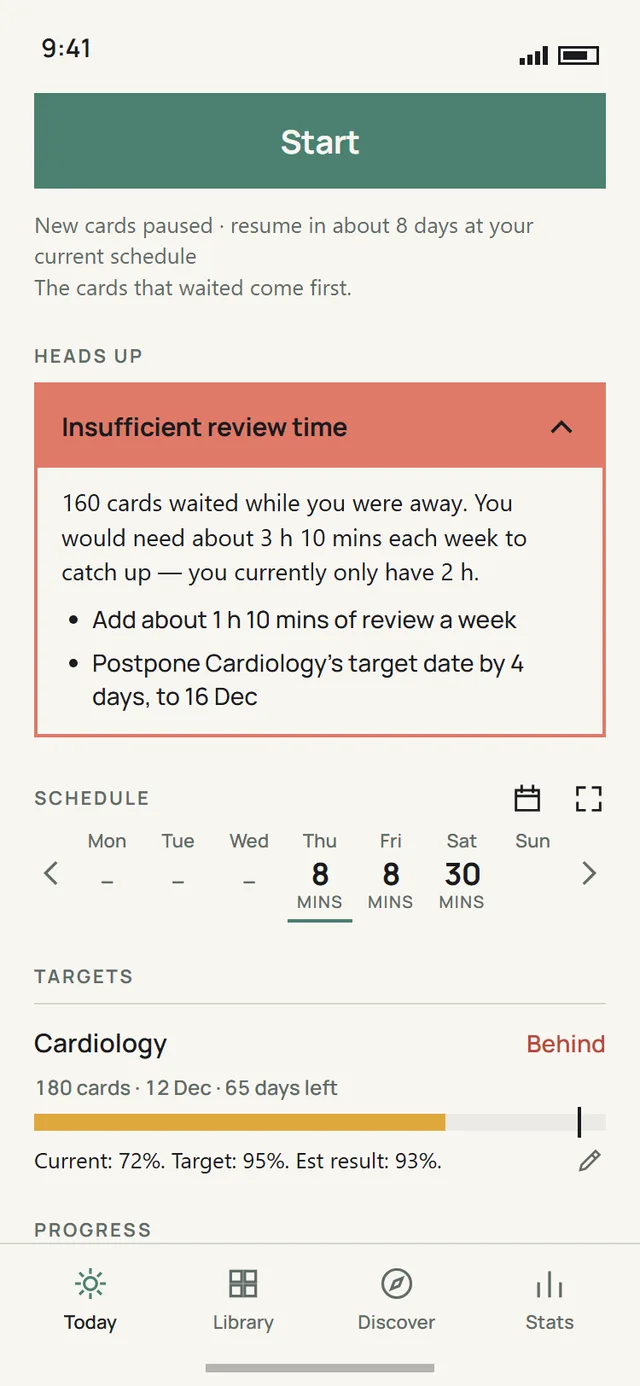
An example from Bunshu's design, not a measurement: ten days away with 1,200 cards costs about twelve ordinary sessions to absorb, and recall across the collection stays around 95% while it does. Bunshu isn't out yet; it's estimated to launch in early 2027. Your Anki decks come across with their review history, so nothing starts over.
Questions people ask
Should I delete my Anki deck and start over?
No. Deleting the deck throws away the one thing the pile can't take from you: the history of what you already know. Cap the day, turn new cards off, and let the queue work down.
Does FSRS fix the backlog?
It fixes the scheduling, not the queue. FSRS chooses better days for each card, so fewer cards come due. The cards that waited while you were away still queue until you see them.
How long does a backlog take to clear?
Nobody can give you a precise figure, and we don't have a measured one. The honest arithmetic is the pile divided by the daily cap you set, plus the cards that come due meanwhile. With new cards off, that is usually a couple of weeks of steady sessions, not a weekend.
Can I bring my Anki deck and its history to Bunshu?
Yes. An Anki deck imports with its images, audio, tags and review history, and suspended cards arrive hidden, so Bunshu knows what you already remember and nothing starts over.
In short
- Turn new cards off until the pile has cleared.
- Set a maximum reviews a day you can keep up, and let the rest wait.
- Study the longest-overdue cards first, with a filtered deck.
- Turn FSRS on and leave its settings alone.
- Don't reset the deck.
Sources
- Anki manual, Deck options: Daily limits (New cards/day, Maximum reviews/day, and the advice on backlogs) and FSRS. Read 31 October 2026.
- Anki manual, Filtered decks: the order Relative overdueness, and its FSRS equivalent. Read 31 October 2026.
- Anki manual, Browsing: the Reset action. Read 31 October 2026.
- FSRS, the open-source memory model: the algorithm. The 196-day example is the model's arithmetic as Bunshu's design states it.
- Our research: 230,816 posts, comments and app reviews by people who use flashcard apps, September 2024 to September 2026, on Reddit, the App Store, Google Play and Hacker News. Quotes are attributed as on bunshu.com.
- Bunshu's design, chapters 4 and 5: how a session is built, and the worked example.